Vibe Coding Week 2 Log: Street Coding on My Commute, 15 Languages and 7 Korean Game Levels — Lessons and Questions
This is my second-week log, following my Week 1 log. This week covers November 13 to 18.
If week one was about setting up the site, week two was about taking on a lot at once. I opened several conversations to add languages at the same time, built one Korean game level a day, and added useful tools as soon as I thought of them. That also meant plenty of things got tangled. And starting this week, I began coding on my phone during my commute.
This log has two parts. The first covers the trial and error; the second collects the questions I asked the AI directly while working, along with why I asked and what the answers were. They’re questions anyone who doesn’t know development, like me, will probably wonder about too.
Week 2 at a glance
- 10 → 15 languages: I added German, Portuguese (Brazilian), French, Russian and Turkish.
- Learn Korean levels 0–7: a Hangul chart, 100 themed vocabulary pages, and 4 new games (sentence blocks, listen and answer, numbers and honorifics, talking about feelings and reasons)
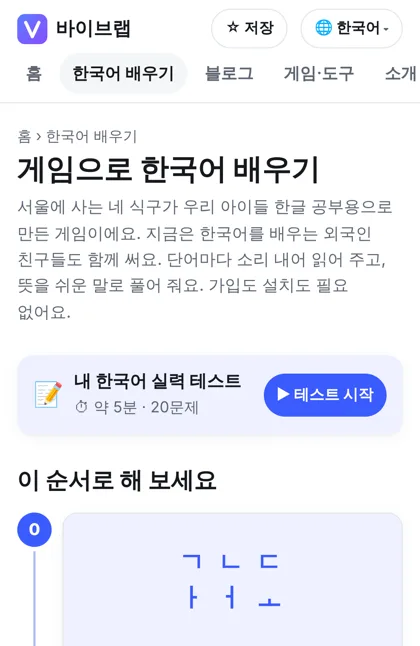
- Korean level test: 20 questions on directions, restaurants, culture and slang, with shareable results
- Korea Tools: public holidays, Korea time, clothing and shoe sizes, halal food, your name in Hangul, Korean age and zodiac animal, reading numbers and more
- Site features: a ☆ save button; Hidden Pictures now picks the next place at random and records your time
- Posts from places I actually visited: the Korea National Arboretum (Gwangneung Forest), the National Museum of Korea, Lotte World, and the best cheering spots for the Seoul Marathon
- Other: connected GA4 to Search Console, requested an AdSense review (still waiting for the result)
Week 2 vibe coding: “street coding” on my commute
In week two, I coded on my phone on the way to and from work. I call it “street coding.”
It turns out this isn’t something you can only do sitting at a computer. My commute is about 50 minutes each way. I tell the Claude app on my phone “fix this part,” and while the AI works, I travel; when it’s done, I check the result on my phone.
Because I’m on my phone, what I mostly end up doing is improving the mobile screens. I’m looking at the site on a phone myself, so text getting cut off or pages scrolling too long jumps out right away. These are just the phone-screen problems I fixed this week:
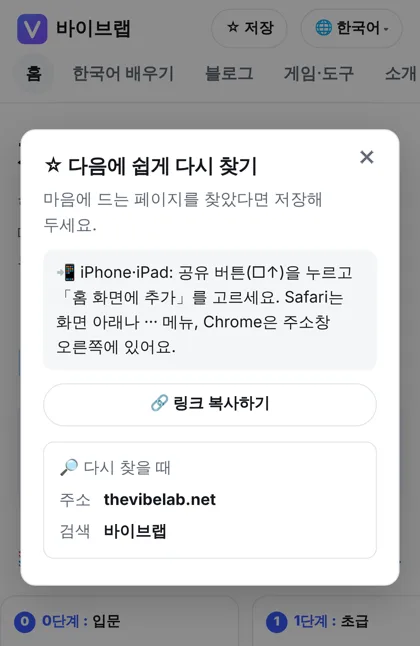
- The “Vibe Lab” name in the save window was splitting across two lines, so I fixed the line break.
- After finishing the feelings game, the buttons on the results screen were cut off and invisible.
- The Korean level test card didn’t fit on one screen, so I shrank it to a single row.
- The themed vocabulary cards needed a lot of scrolling, so I switched them to two columns.
The advantage of street coding was that I could fix things that are easy to miss at a computer while looking at the same screen my visitors see.
1. I said “I merged it,” but it wasn’t merged
This was the mistake I repeated most often this week. More than four times, I clicked the Merge button on GitHub and said “I merged it,” but the PR was actually still open. Either I hadn’t clicked the Confirm merge button that appears after the first click, or I’d merged a different PR.
The opposite happened too: the AI said “It’s merged and all done” without checking, and later apologized, saying “That was wrong.”
Lesson: After merging, check that the purple “Merged” label shows up on the PR page. And if you ask the AI to “check yourself whether it’s merged,” it will.
2. Checking the deploy always came down to my phone
The environment the AI works in can’t reach thevibelab.net, so every time the AI said, “I couldn’t check myself whether it’s live on the site.” So I always checked deploys on my phone.
When I asked, “Why isn’t Russian showing up?”, it was either still deploying, or — because the home page picks the language based on the country you visit from — I had to add /ru/ to the address to see it. A little later it ended with “It’s there, I checked,” but I learned that merge → deploy → my screen takes time.
3. What happened when I added 3 languages at once
After adding Portuguese, I got greedy and had French, Russian and Turkish done at the same time, each in its own new conversation. It finished quickly, but the three jobs were editing the same files, so they clashed with whichever was merged first. When merging Turkish, 57 files had conflicts, and I kept having to change the phrase “13 languages” to 14, then 15.
Each language had its own issues too:
- The game title font didn’t include German ä, ö, ü, ß or Russian Cyrillic, so I had those languages use a different font first.
- In the Russian blog posts, each AI that took a share of the translation wrote place names differently — in Cyrillic, in Latin letters, or both. I decided “leave place names as they are” and wrote it down as a rule.
- Even within one language, the word for “level” got mixed up — “Fase” in the games and “Passo” in Learn Korean, for example — so I left it on my homework list.
Lesson: Running several jobs at once is fast, but decide the merge order in advance. This time the AI guided me: “Merge in the order French → Russian → Turkish.”
4. I redrew the pictures four times
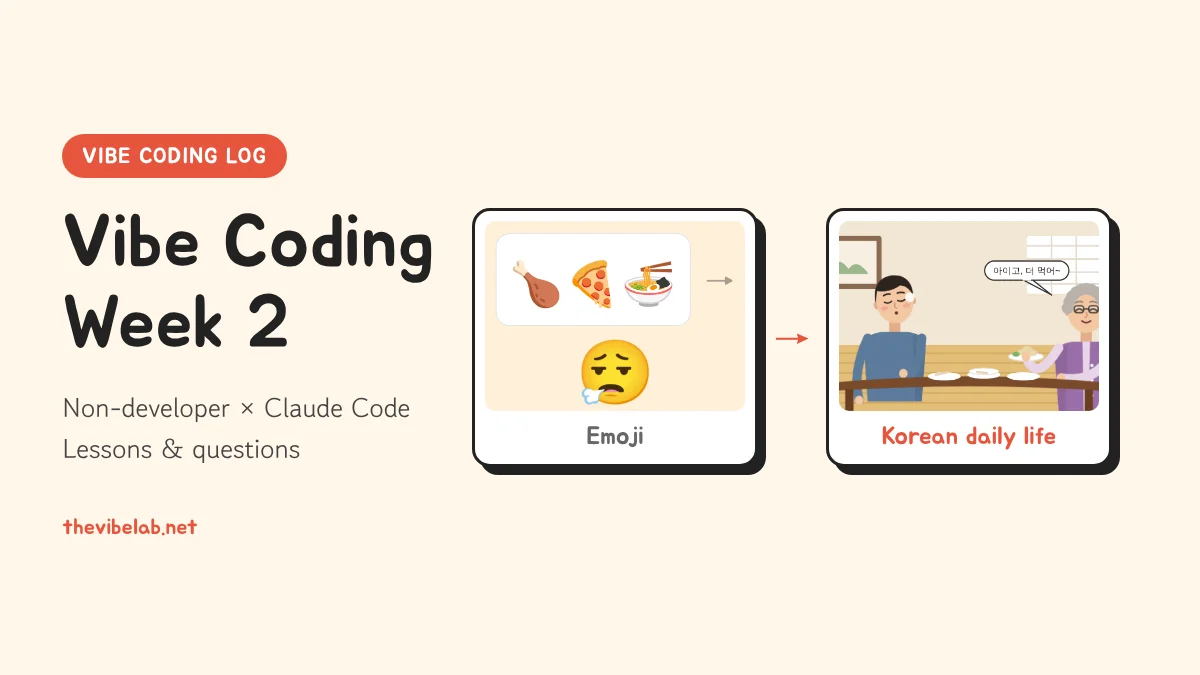
Level 7 of Learn Korean, “Talking about feelings and reasons,” first used emojis for its pictures. When I tried it, “the images are way too cheap-looking,” so I started changing them — and ended up redoing them four times. Below are screenshots of the same question (answer: 배불러요, “I’m full”) in each version.
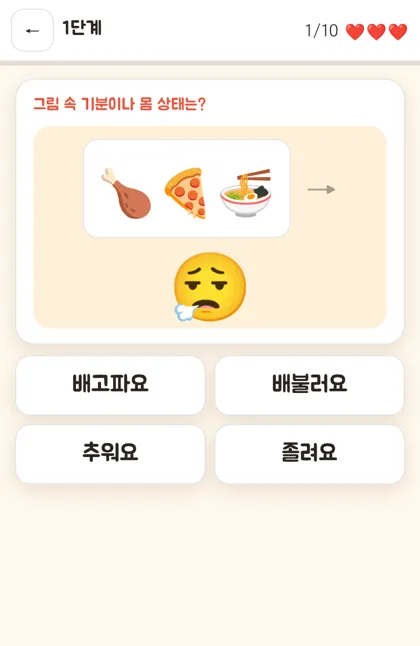
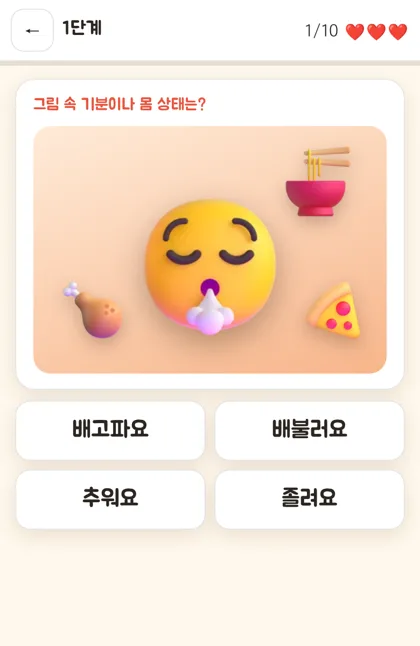
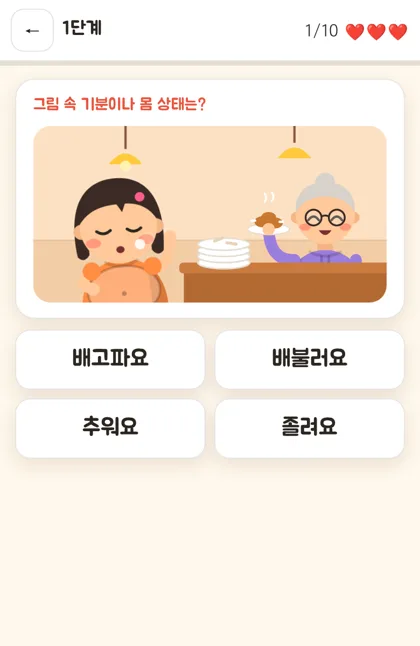
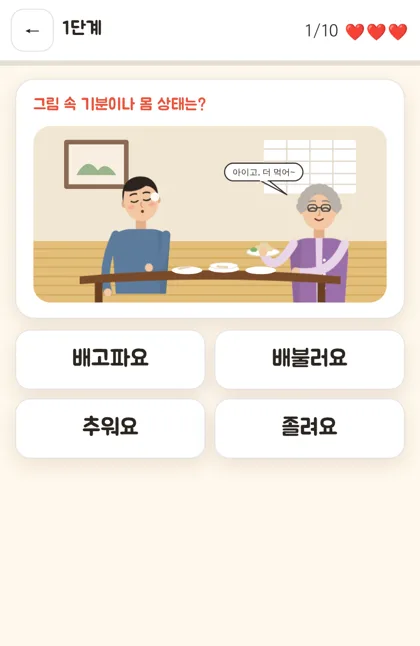
This is roughly what I said:
- “I’d like it to show one person, and instead of just the background, facial expression and clothes, think about the place and the relationships between people.”
- “Lose the children’s-book illustration feel and make it feel true to real life in Korea.”
- “How about adding habits that are unique to Koreans to make it more authentic? Like typing ‘ㅋㅋㅋ’ when you laugh.”
So now there are scenes like the morning commute where someone dozes off on the shoulder of the person next to them on the subway, an iced Americano in the middle of winter, and someone saying “네네네~” (“yes, yes, yes~”) on the phone. Finally, I added a box that explains the Korean culture in the picture in one line once you get the answer right.
Lesson: The pictures changed dramatically when I said “who, where, and with whom” instead of “make it prettier.”
5. I built tools at the same address twice
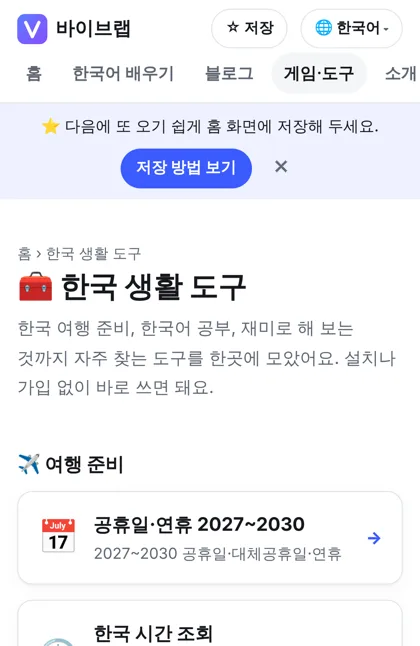
While asking for ideas to grow traffic, I ended up making “Korea Tools” — but in another conversation, I happened to be building Korea time, address conversion and MBTI tools at the same time. Both used the same /korea-tools/ address, so they overlapped, and seven tools were crammed onto a single page.
In the end I said, “The structure is a total mishmash,” and asked for it to be sorted out. Now each tool has its own page, grouped into three categories: trip prep, Korean language and fun.
6. The battle for accurate drawings continued this week
The Seoul Marathon cheering scene was drawn from the real street in front of my home, so there was a lot to fix:
- “The other side wasn’t part of the marathon route — regular cars were driving there.”
- “The crosswalk stripes run horizontally, and the traffic lights are vertical.”
- “The sizes of the people look unnatural for the perspective, and the ambulance is way too small compared to the people.”
- “My kids look like they’re wearing short sleeves and shorts. It’s winter now.”
The National Museum of Korea “rainy-day courtyard” scene was the same. When I asked, “You drew the kids way too big in the rainy-day one. And why aren’t they using umbrellas?”, it turned out it had made only the children bigger and left the adult next to them as they were, so the proportions were off. The orange flag planted in the courtyard was the indoor Children’s Museum flag, drawn outside by mistake.
As I learned in week one, I showed photos and pointed things out one at a time, and eventually it came out right. But earlier I’d said “remove the people on the other side,” and later I said “make the middle a police officer and the two ends volunteers,” so the instructions clashed. In cases like this, the AI followed the most recent instruction.
7. Small problems that come with changing one picture
- In level 4, sentence blocks, the emoticon pictures were small at first, which led to the comment, “There isn’t enough explanation and it’s too small.” I put a big picture in the middle and added trap blocks and 3 hearts.
- Every blog post showed its first photo twice. It happened because the cover photo had also been put at the top of the post body, so I fixed 5 posts and wrote it down as a rule so it won’t happen again.
- I added a “with kaydn” label to a friend’s photo, but the browser kept remembering the old photo for 4 hours, so I couldn’t see the change. I fixed it by renaming the photo file.
My week-one lesson (“tap through it on your own phone”) held up this week too.
8. The home page and blog got cluttered
As I kept adding features, the home page showed the same buttons twice, in the menu and in the main content, and the blog’s front page had so many tags that they hid the posts. There were 73 tags across 12 posts, and 84% of them were attached to just one post.
- I made the blog show only 8 tags and collapsed the rest. At first they were in order of use, but I changed it with “shuffle them randomly.”
- I cut the home page down to three blocks: “Take the test → Learn Korean → Blog.” My thinking was, “Shouldn’t the Korean level test come first, and then you start studying from level 0?”
- I renamed the menu item “Learn Hangul” to “Learn Korean.” I figured people from other countries don’t search for “learn Hangul” — they search for “learn Korean.”
9. Features I built and then put “on hold”
This week there were also things I built and then paused.
- Dialect and slang translator: I built a translator I could fix myself by adding dialects and new slang, but stopped when I learned it costs money every time it’s used. (More in the questions section below.)
- Celebrities with the same type in MBTI results: on hold because of photo copyright issues.
- Foreign address conversion: it only works once I get an approval key for the Ministry of the Interior and Safety’s address API, so I’m waiting for now.
In week one I “scrapped” 3 games; this time it’s “on hold.” I kept the ideas and wrote them on my homework list.
10. “Why is it Chap-man?” Fixing how names are read
When I put Chapman into the “Your name in Hangul” tool, it came out as “찹만” (chap-man). I asked, “Koreans read this as 채프먼 (chae-peu-meon). Why is it 찹만?”, and it said that names not in its dictionary were being read one letter at a time. Deutsch was also read oddly at first, instead of as “도이치” (do-i-chi).
So I added English and German pronunciation rules and built a dictionary by collecting the Korean spellings of about 9,800 personal names from Wikidata (open data anyone can use). I also made it possible to convert names written in Chinese characters and Thai script.
11. The AI kept answering in English instead of Korean
A few times, the AI sent its progress updates in English. Every time, I had to say again, “Explain it in Korean.” It even happened once while I was making this log.
12. The AI can’t organize my conversation list
With so many conversations, I wanted to make a “Games” group and move them into it. When I said, “Put this under the games section,” the AI took it to mean where the game code lives and started moving files. I stopped it with “Stop,” and learned that the AI can’t move items in the conversation list — I have to drag them there myself.
13. “Merge” and “deploy” are different
The merge was done, but the site hadn’t changed, so I asked several times: “It says the deploy succeeded?” “Is that right?” It turned out one build on Cloudflare (the service that puts my site online) was stuck at “Getting things ready…”, and the deploys after it were all backed up behind it. Once I canceled the stuck deploy, they finally went live one after another.
Lesson: A merge means “the code has been combined”; a deploy means “it’s live on the site.” In between, it can take a few minutes, sometimes longer.
14. Photos I pasted into the conversation disappeared
I pasted photos for a post into the conversation, but some of them only showed up on the AI’s screen and were never saved as files. So I sent the same photos again several times, which sometimes created duplicate files. When there were lots of photos, sending a Google Drive folder link was the reliable way.
15. Finding photos with no copyright worries
While adding example photos to the Hangul chart, like “ㄱ – 기차 (train),” I asked, “Of course, use photos with no copyright issues.” But Wikimedia blocked us for making too many requests, the photo site Pexels wouldn’t issue a new key, and other public photo searches were slow and threw errors. In the end, 15 photos went in: I left out a robot photo with a visible trademark, and a cherry photo never turned up at all.
Besides, copyright-free photos are nice, but once I actually put them in, they weren’t the quality I wanted. Many didn’t fit “Korea” at all, like foreign streets or old photos.
So I decided to collect photos I take myself. I went to a public parking lot at night and took a ton of photos of cars and objects like parking spaces, chargers, signs, traffic cones, and street lamps, and stored them in a “photo warehouse” folder on Google Drive. I’m swapping these photos in one by one for the “Found it!” photos and word cards in Hidden Pictures.
16. One conversation instead of Slack
I wanted to get my list of photos to take as a daily notification, so I tried connecting Slack, but it never worked. So I decided, “Until Slack works, let’s replace Slack with a single Claude session.” Now one conversation tells me every morning at 9 which photos to take that day.
Questions I asked (why I asked, and the answers)
These are things I asked along the way while working. The answers are short summaries of what the AI explained at the time. Anything about costs or law is the AI’s explanation as of November 2026, so be sure to double-check before you actually rely on it.
Money and servers
Q. “If visitors to my site use the translator, does that use my tokens?”
- Why I asked: Right after asking for a translator that mixes in dialects and slang, I wondered whose money gets spent when visitors use it.
- Answer: Yes. Every time a visitor translates, it calls the AI with my API key, and that’s billed separately from my Claude subscription. At first it said “a few won,” then recalculated and corrected itself: with the best model, it’s about 20–30 won per use.
Q. “Is there any way to make it close to free?” / “If I limit it to 300 uses, does it become free?”
- Why I asked: At 20–30 won per use, the more visitors I get, the bigger the burden.
- Answer: Switching to a small model (Haiku) makes it about 30 times cheaper. Daily usage limits and monthly caps don’t make it free — they set a maximum amount. There’s also free Cloudflare AI, but its dialect quality is worse, so it didn’t recommend it. In the end, I put it on hold.
Q. “If I offered the translator for about 10,000 won a month, would lots of people come?”
- Why I asked: I was looking for ideas to grow traffic.
- Answer: It said competing with Papago and Google Translate would be hard. Instead, it recommended tools like “Korean public holidays” and “Your name in Hangul,” where one tool becomes hundreds of searchable pages — and that became Korea Tools.
Q. “If someone enters a foreign address and converts it to a Korean address, does that cost extra?”
- Why I asked: While building the Korean address converter, I wondered if going through translation would cost money.
- Answer: Practically zero. But a plain translation gives wrong addresses like “Olympic Road 300,” so the right approach is to show the official English address from the Ministry of the Interior and Safety’s road-name address API. That API works by storing an approval key on the site’s side (Cloudflare) and calling it, so it won’t work until I get that key.
Q. “Does Vibe Lab have a server?”
- Why I asked: While studying with vibe coding YouTube videos, I heard that “servers are important” — but I didn’t actually know whether my own site had one.
- Answer: I don’t rent a server of my own. Vibe Lab works by having Cloudflare Pages send pre-built page files around the world for me. Things that need a calculation on the spot, though, run as small pieces of code (Functions) on Cloudflare: sending visitors the language that matches their country, the leaderboard for Hangul Word Search (a small database), and Korean address conversion. Logging to Google Sheets is handled by Google Apps Script. That’s how I’ve gotten this far without “renting and managing a server.”
Q. “With just this much content, is the site good enough to apply for Google AdSense?”
- Why I asked: After connecting Google Analytics and Search Console, I started thinking about ad revenue next.
- Answer: The pages and settings it needs were all in place, but with only about 7 topics and a domain just one week old, it recommended waiting 1–2 weeks. On the other hand, it said there’s no penalty for being rejected, so I decided, “If there’s no downside, let’s just apply and hear what’s missing.” I applied on November 13 and I’m waiting for the result now.
Copyright
Q. “If a song clip is under about 15 seconds, there’s no copyright problem, right?”
- Why I asked: I wanted to try making a game that teaches Korean through songs. I’d heard that “under 15 seconds, there’s no copyright problem,” so I checked.
- Answer: It said that’s a common misconception. There’s no legal rule that “up to a certain number of seconds is fine”; if the part is recognizable, it can be infringement. YouTube and Instagram have their own licensing deals as platforms, so it’s different from my own website. It told me to use free or paid stock music, or music I make myself.
Q. “Naver bloggers use celebrity photos and credit the source. But those posts have AdPost ads in them. That’s a right-of-publicity problem, right?”
- Why I asked: I wanted to show Korean celebrities with the same type, with photos, on the MBTI test results.
- Answer: Crediting the source isn’t the same as permission. In practice, photo copyright is the bigger problem, and it could affect AdSense too. It suggested using only names, the MBTI the person has made public, and the source article — no photos. (On hold for now.)
Q. “I want to develop it a bit more… my reference is Duolingo” / “Could I raise the design quality by using Figma?”
- Why I asked: I wanted better pictures for the feelings game, so I was looking for something to use as a reference.
- Answer: We can’t copy Duolingo’s pictures as they are, so it suggested drawing our own characters with a similar feel. Figma is a tool people use to polish things by hand, so it said a good split would be: the AI draws, and a person polishes.
Search and visitors
Q. “Why hasn’t the search performance tab updated since November 10?”
- Why I asked: I check search numbers in a Google Sheet every day, and they’d been stuck for several days.
- Answer: It wasn’t broken — Google Search Console finalizes its numbers 2–4 days late. I changed it to also pull the provisional numbers before they’re finalized, and it filled in right away.
Q. “How can I get more exposure to users in China?” / “What is 百度 (Baidu)?”
- Why I asked: I’d even built Chinese pages, but I was seeing almost no visitors from China.
- Answer: Google is blocked in China, so games that use Google Fonts stall, and Google Analytics barely picks up visitors from China. I had the site serve the fonts itself and added Cloudflare’s visitor analytics. Baidu is like “China’s version of Search Console”; it might not have much effect, but it’s free, so it said to set it up anyway.
Q. “Is there a way to make the Korean level test easier for people from other countries to find? Including AI search.”
- Why I asked: After building the test, it only means something if people actually find it.
- Answer: It said the questions only appear after you press a button, so AI search can’t read the content. I showed sample questions and an at-a-glance table as text, added more links to the test from around the site, and added a button to share results.
Q. “If I post free photos on a web page, would lots of people come looking for them?”
- Why I asked: I have lots of photos I took myself, and I wondered if I could use them to bring in visitors.
- Answer: Plain free photos can’t compete with big photo sites, but narrowing it down to “photos I took myself of places in Korea” might be worth a try.
Q. “(Looking at the Google Analytics screen) What’s this? It seems like a good thing to do.”
- Why I asked: A “Link Search Console” card had popped up in Google Analytics.
- Answer: It said it’s free, and once they’re linked, I can follow how long people who came in through each search term stay on the site. I linked it right away.
Q. “But I’ve already posted the old game addresses all over other blogs. If people click those, won’t they be unable to play?”
- Why I asked: When it said it would build a new Learn Korean page so people from other countries searching for “learn Korean” would find us, I got worried about the links I’d already posted here and there.
- Answer: It’s adding a new page, so the existing addresses stay the same. If anything, it said, the existing links will keep helping my search ranking.
Choosing languages
Q. “Which of the world’s top languages haven’t I added?” / “Is Hindi hard?” / “Which languages search a lot about Korea?”
- Why I asked: To decide which language to add next, I showed it a ranking of languages by number of speakers and asked.
- Answer: Of the top 10, I was missing Hindi, French, Arabic, Portuguese, Bengali, Russian and Urdu. Arabic and Urdu are written right to left, so the screens would need separate work. Hindi is technically easy, but people in India apparently search a lot in English. Based on the AI’s estimate, it recommended Portuguese → French → Russian, and I added them in that order.
Q. “Which countries speak German, how many people, and what kinds? What German is common to all of them?”
- Why I asked: Before adding German, I wanted to know which country’s style to use.
- Answer: It’s an official language in 6 countries, with about 100 million native speakers. The standard language differs a little between Germany, Austria and Switzerland, but it said one common Standard German would do.
Q. “In Korean we use both 낱말 and 단어 for ‘word.’ Which one gets explained to people from other countries?”
- Why I asked: The games were mixing “낱말” and “단어.”
- Answer: They mean the same thing, and in other languages both become a single word like “word” or 単語. So I made the Korean pages consistently use “단어” too.
How I work
Q. “If reviews or CI results come in on the PR…? What does that mean?”
- Why I asked: The AI said this every time after creating a PR, and I didn’t know what it meant.
- Answer: A review is a comment on the PR asking for changes, and CI is a build and check that runs automatically. Vibe Lab doesn’t have a separate CI, so it basically meant, “If you ask for a fix in a comment, I’ll fix it.”
Q. “If I archive, this thread doesn’t disappear and everything gets recorded in the Google Sheet, right?”
- Why I asked: I “archive” at the end of every conversation, and I wasn’t sure whether that made the conversation disappear.
- Answer: The conversation stays; only its name changes to the date and what was done. What I did goes into the “work log” in the Google Sheet, and what’s left goes into the “homework list.”
Q. “For the second visit, what counts as a visit?”
- Why I asked: While building the ☆ save button, I was deciding when to show the “Save this for later” prompt on phones.
- Answer: At first it was based on “how many times you open a new browser tab.” I changed it to show up when you’ve viewed 2 pages, and then every 10 pages after that. I also changed the “search term for finding us again” in the save window from English to the local language, like バイブラボ or ไวบ์แล็บ.
Q. “The app still looks the same. Is that because it’s holding on to cached data?”
- Why I asked: Right after merging, I opened it on a tablet, but I couldn’t see any change.
- Answer: It said the game files are set to check for a new version every time, so the cache was unlikely to be the cause. Looking at the screen, the deploy had finished barely a minute earlier. After waiting a little, the change showed up.
Q. “My son plays the game on his tablet. When he gets an answer right, why does it sound like a foreigner pronouncing Korean?”
- Why I asked: My son plays Hangul Word Search on his tablet, and the voice reading out the answers sounded awkward.
- Answer: It’s because the game uses the device’s built-in read-aloud feature (TTS), not recorded audio. Android reports its list of voices late, but the game was checking too early, so it picked a low-quality voice. It fixed that and also told me how to download a Korean voice in the tablet’s settings.
Q. “In Hidden Pictures, when you press Next game, are they shown in order instead of at random?”
- Why I asked: When I played, it seemed like they always came up in the same order.
- Answer: I was right. So now it picks at random from the scenes you haven’t cleared yet, and I added a record of how long you took plus a little congratulations like “Do you have lasers in your eyes?”
What I learned after two weeks
- Doing several things at once is fast, but things get tangled. Opening several conversations gets work done faster, but in exchange I had to keep track of the merge order and whether jobs were using the same address.
- Always check “Is it done?” Whether I say “I merged it” or the AI says “It’s done,” either of us can be wrong.
- Ask first about features that cost money. For features like the translator, which cost money every time a visitor uses them, it was good to ask “Whose money does this spend?” before building.
- Asking questions is how I learn. Reviews, CI, merging, caching, copyright… by asking about things I didn’t know as they came up, I learned quite a lot in just two weeks.
You can see what I built this week in Learn Korean and Korea Tools. I’ll be back next week with my Week 3 log.